Your spam folder,
sorted and summarised

spam-digest reads the spam folders of your IMAP mailboxes, lets AI sort each email into probably legitimate, uncertain or spam, and sends you a digest you can act on from a web page: rescue it, trust the sender, or delete it.
Get started Read the docs View on GitHub
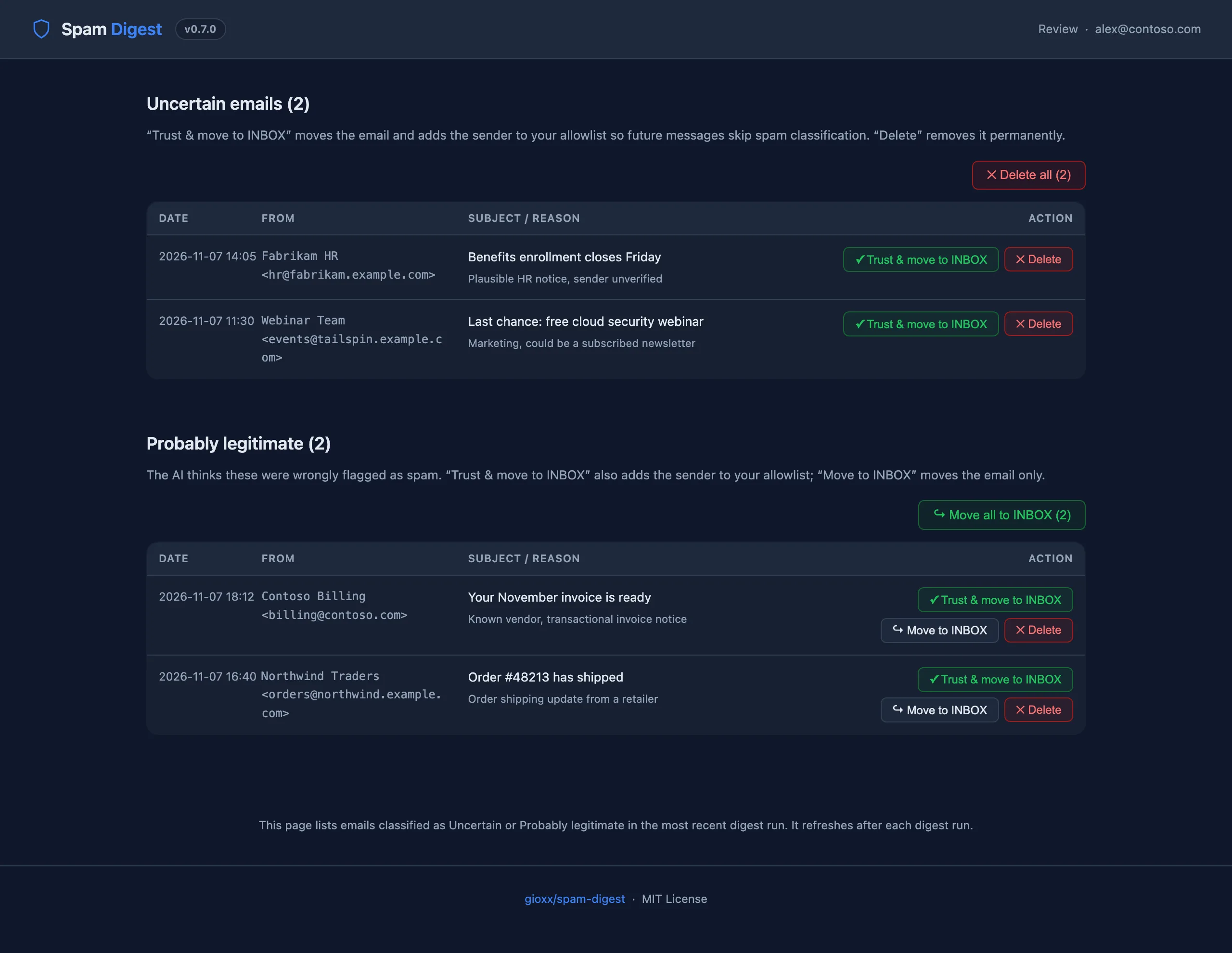
spam-digest review page: two uncertain emails and two probably legitimate emails, each with Trust and move to INBOX, Move to INBOX and Delete buttons

Stop losing real email to the spam folder

A small, focused tool: one email a day tells you what landed in spam, and a couple of clicks fix the mistakes.

Daily digest email

On your schedule, one HTML email per mailbox lists what is in the spam folder: sender, subject, date. No email when the folder is empty, unless you ask for it.

AI triage (optional)

Anthropic Claude labels each email probably legitimate, uncertain or spam with a short reason. Only the sender and subject are sent, never the body.

Rescue from the browser

A review page linked from the digest moves an email to INBOX, optionally trusting the sender, or deletes it. Bulk buttons handle a whole section at once.

Blocklist and allowlist

Rules by sender, domain or subject keyword. Blocked emails are deleted at the next run, allowed ones moved to INBOX, and both are listed in the digest for transparency.

One-click cleanup

Delete everything the AI confirmed as spam with one button, after a confirmation page, so link scanners in your mail system can't delete anything on their own.

Signed, rotating links

Web actions use HMAC-signed links that rotate with every digest. They only act on the emails listed in the last run, never on anything else in the mailbox.

Multi-mailbox

Watch any number of IMAP accounts from one container, each with its own spam folder and digest recipient. Common folder names are detected automatically.

Status dashboard

Schedule, configuration and last-run results per mailbox, with buttons to run a digest now for one mailbox or all of them.

Zero dependencies

Pure Python standard library in a small Docker image on Docker Hub and GHCR. Digest delivery via SMTP or Resend.

From the digest to a clean folder

All screenshots use placeholder data (contoso.com, example.com).

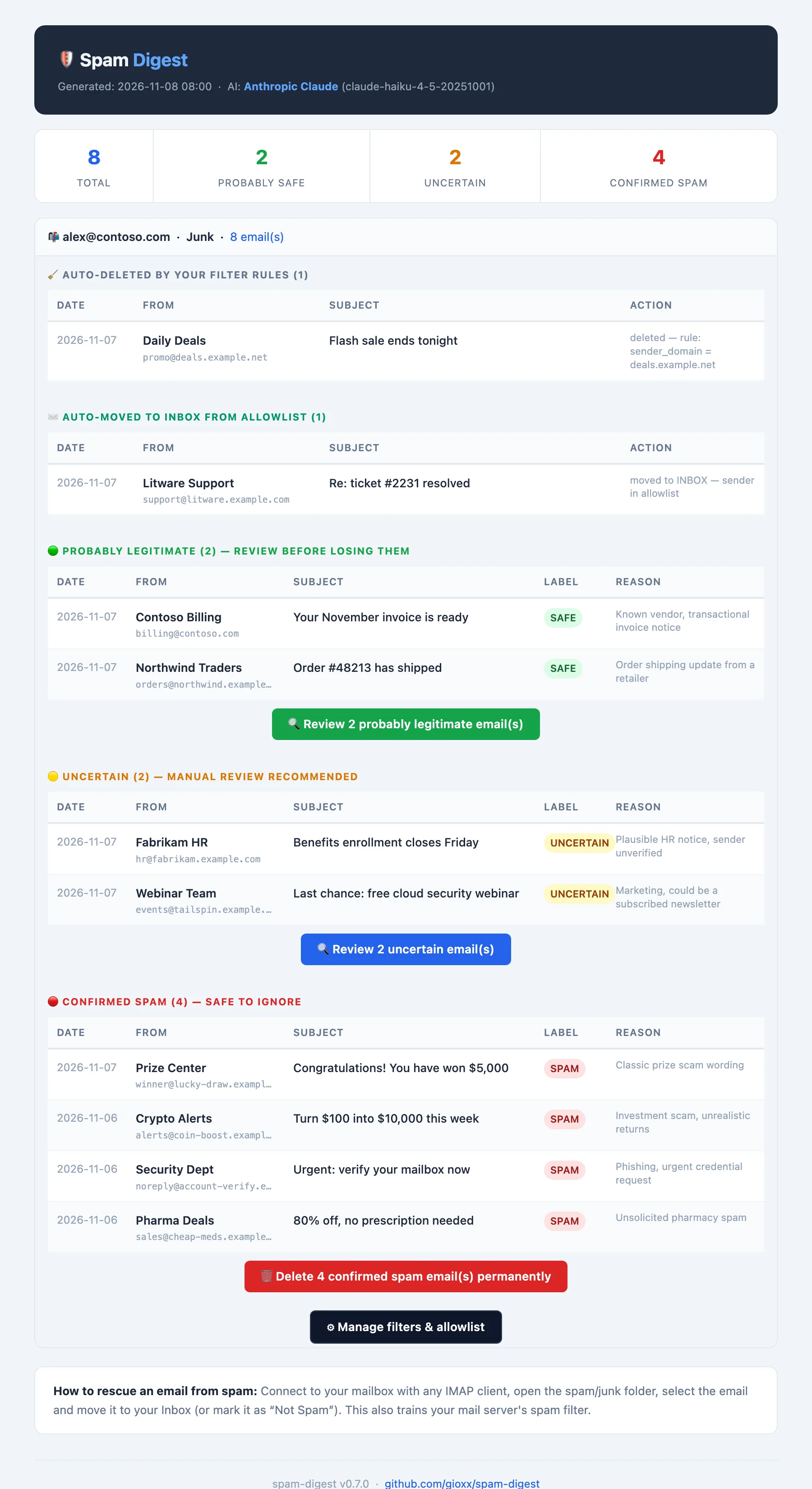
Digest email: summary counters, auto-deleted and auto-moved sections, then probably legitimate, uncertain and confirmed spam tables with review and delete buttons

Digest email. Emails grouped by AI label with the reason, what your rules already handled, and buttons to review or delete. (Scroll inside the image.)

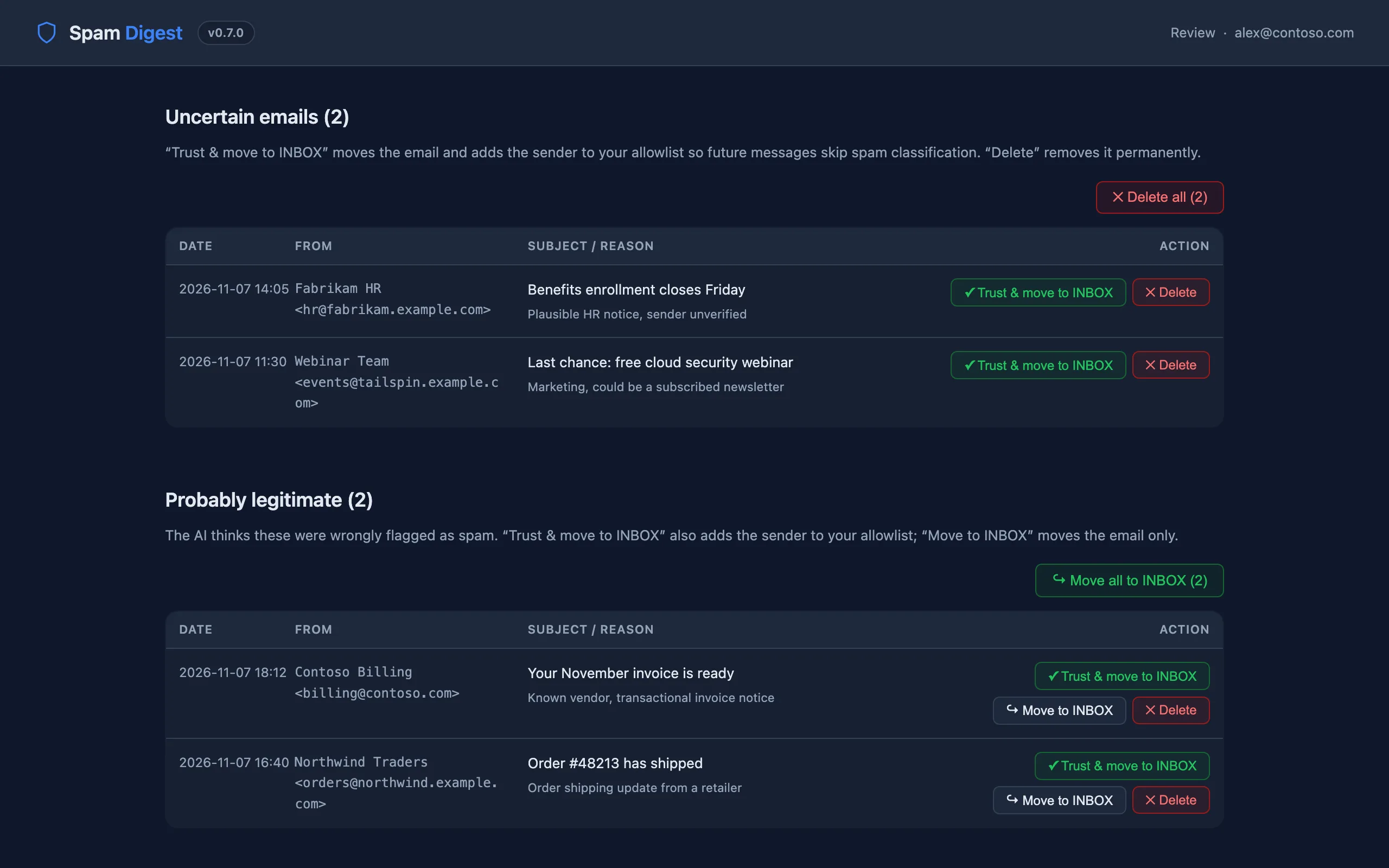
Review page with uncertain and probably legitimate sections and bulk buttons

Review page. Trust and move to INBOX, move without trusting, or delete, one email at a time or a whole section.

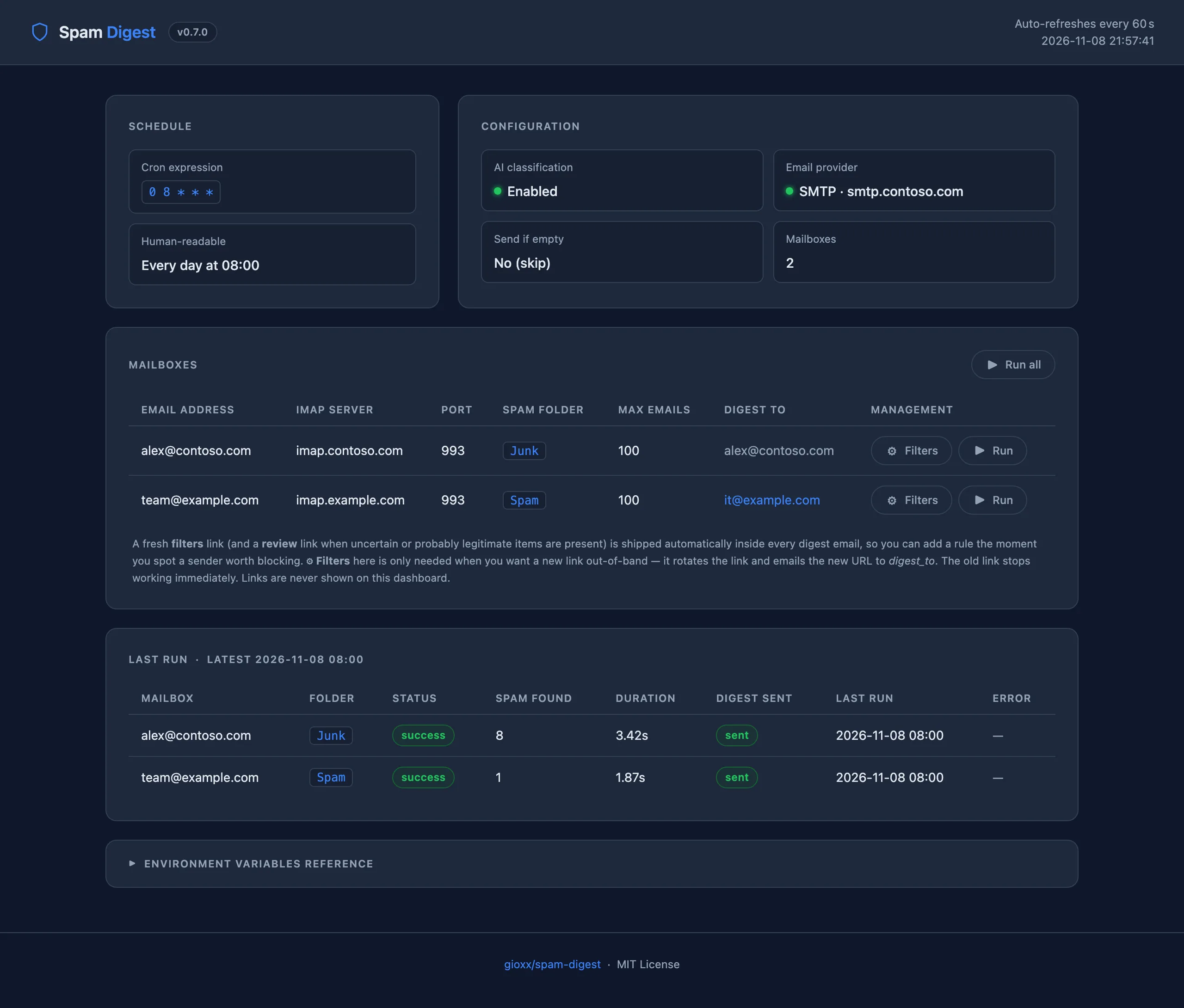
Status dashboard with schedule, configuration, two mailboxes and last-run results

Dashboard. Schedule, configuration and the last run of every mailbox, with Run buttons.

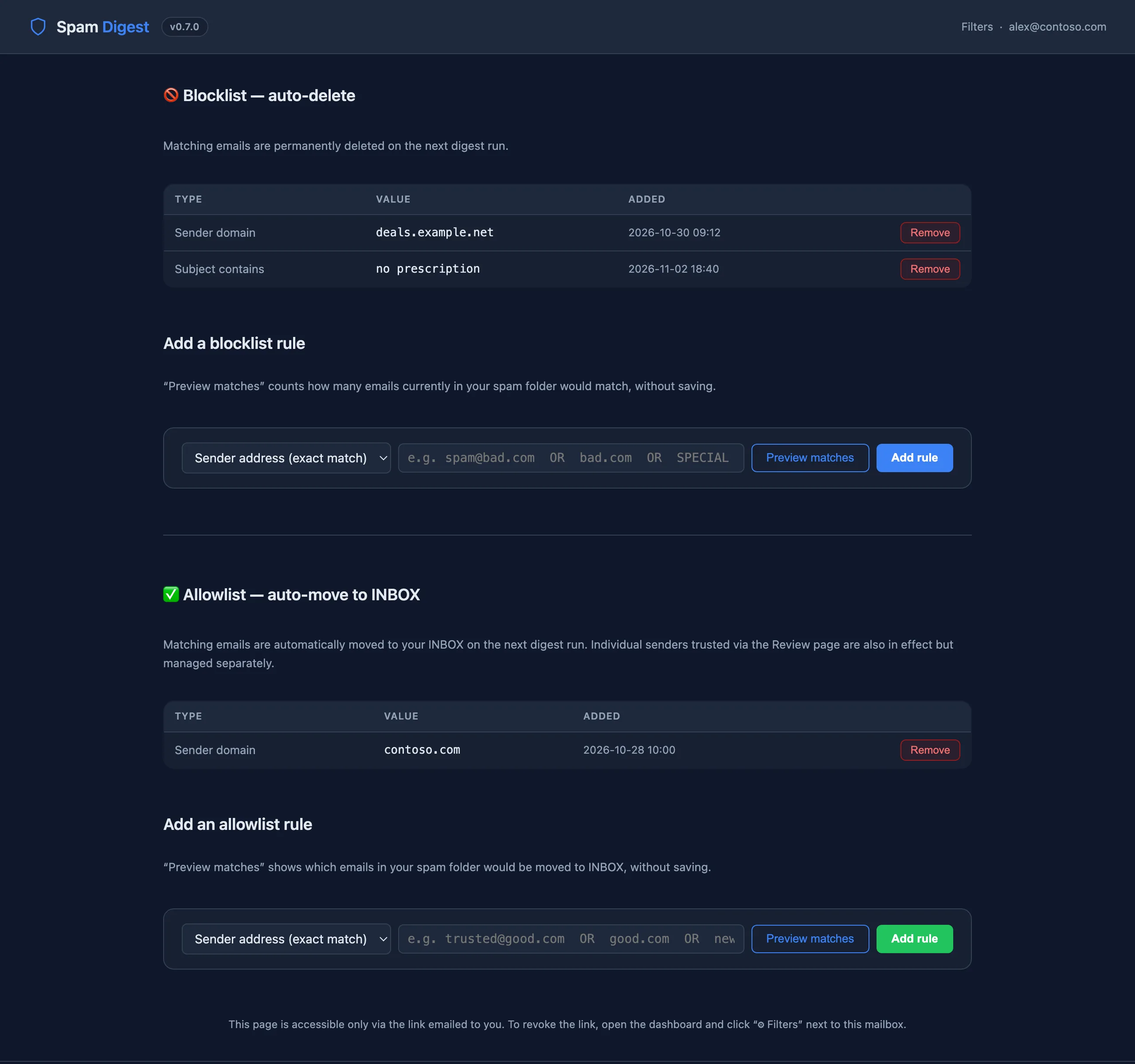
Filters page with blocklist and allowlist rules and forms to add new ones

Filters page. Blocklist and allowlist rules, with a preview of matching emails before you save.

Every run, for every mailbox

At the scheduled time (or when you click Run on the dashboard) spam-digest runs these steps.

1

Read the spam folder

It connects over IMAP, opens the spam folder (trying common names if the configured one is missing) and reads only the headers of the newest emails.

2

Apply your rules

Emails matching a blocklist rule are deleted, and emails from trusted senders or matching an allowlist rule are moved to INBOX, in the same IMAP session.

3

Classify with AI

If enabled, sender and subject of the remaining emails go to Claude, which labels each one probably legitimate, uncertain or spam.

4

Send the digest

The digest is emailed via SMTP or Resend, with freshly signed links to the review page, the filters page and the delete button. Older links stop working.

5

Act from the web page

From the links you rescue, trust or delete. Every action touches only the emails listed in that digest.

Up and running in minutes

All you need is Docker with Compose. Official images are published for every release:

tags: latest · X.Y.Z · dev

Docker Compose

# Get the compose file
mkdir spam-digest && cd spam-digest
curl -LO https://raw.githubusercontent.com/gioxx/spam-digest/main/docker-compose.yml

# Set your IMAP, SMTP and (optional) AI settings
nano docker-compose.yml

# Start
docker compose up -d

The dashboard is at http://localhost:8080. Set TZ to your timezone: the schedule uses it.

Minimal settings

environment:
  IMAP_SERVER: imap.example.com
  EMAIL_USER: you@example.com
  EMAIL_PASS: your-imap-password
  SMTP_HOST: smtp.example.com
  SMTP_USER: you@example.com
  SMTP_PASS: your-smtp-password
  # Optional: AI triage and web actions
  AI_PROVIDER: anthropic
  AI_API_KEY: sk-ant-...
  WEB_BASE_URL: https://spamdigest.example.com

WEB_BASE_URL is the public address of the dashboard: without it the digest has no review, filters or delete links.

Update

docker compose pull && docker compose up -d

Pin a release (e.g. gfsolone/spam-digest:0.7.0) instead of latest to upgrade on your own schedule.

Configure, run, integrate

The full documentation lives on kb.gioxx.org, next to Clean Mail Automation, a related tool that deletes old emails from IMAP folders.

The dashboard has no built-in login. Keep port 8080 on a trusted network, or put it behind a reverse proxy with authentication. The review, filters and delete pages are protected by their signed links.